
Showing posts with label #Gaming 102. Show all posts
Showing posts with label #Gaming 102. Show all posts
Wednesday, 13 June 2018
Gaming 13/5
Success! First project of this course handed in. Im mostly happy with how my environment turned out, there is a few things I would change if I had more time though. Firstly, I though of adding the angel tower in class today, I think it turned out ok considering how much time I had, but I definitely would have liked to play around a bit more, add some more detail, make it more interactive. I think I could have made it possible to walk through the doors on each level.. if only I had decided to add it earlier! The run speed is a little frustrating, I would love to make her run faster, however at the faster speeds when she hits a tree or a bump, she ends up going flying off in a random direction. Im not sure if thats colliders or just a side effect of the faster run speed. My character is currently balanced between not sluggish running, and just able to walk up the mountain path that I created. The path is the final thing I would change. I think if I had spent more time working on it, I would have been able to get a smoother path up the mountain, instead of having to fight the characters penchant for following the ground angle as she walks over it. All in all though, it was good to play around in unity and I learnt a lot.


Thursday, 7 June 2018
Gaming 6/6


I made a thing! After so much fiddling and wasting time, in the end I just spent a couple of hours and re-made my terrain. Something was making the trees broken and I could not figure it out. Ultimately, I think it was a good thing because I got to redesign my environment a little bit, and Im much happier with the 2nd iteration. After struggling with the imported character not having her eyes, I figured out that the mesh didnt have the eyes selected the final time that I exported her so that was an easy fix too once I discovered it. The wobbly walking on terrain that is 100% flat still bugs me, but thats part of the limitations of using Unity the way we are, and just have to work around it with the terrain tools as best as we can. One week to go, and all I have to do is finish the concept art, Im feeling happy with this one.
Wednesday, 30 May 2018
Gaming 30/5
Shes broken! Lol, my characters rigging on her hands is a bit wonky, so she has perpetual claw hands when running around. I am having fun creating hidden away flat spots for her to stand on up the mountains, to get the good views. Unfortunately the trees still arent working, so I potentially will have to create a new terrain from scratch. Thankfully making terrain in Unity is fairly painless. I think I might work on a new terrain anyway, sometimes that is the best option.


Friday, 25 May 2018
Gaming 23/5

My environment is coming along the way I want, however I have hit a roadblock in that I cant place any trees. The brush works, but nothing shows up so Im not sure if its a ram thing, or a unity glitch. =( I may have to switch to photoshop for my character concept art piece unless I can make some of this area look like a forest. I have been enjoying unity, you can create some pretty cool looking things fairly easily which is good for me since I am so new to 3D modelling.
Wednesday, 16 May 2018
Gaming 16/5
Today was spent working on my terrain again. Im quite enjoying this part of it, but I need to be careful and not get caught up in doing lots of little details at the expense of the rest of the environment.
Thursday, 10 May 2018
Gaming 9/5

Superhero pose woo! The Unity update doesnt seem to have affected my previous terrain at all, so I can carry on modifying that to create my forest paradise for my character. I cant wait to have her running around in it. The mesh is a bit warped when she is kneeling down like this, but thats where the creative camera angles come into play. I am pleased with how everything is progressing in this class so far.
Thursday, 3 May 2018
Gaming 2/5
Its a bit rough coming back after 2 weeks away and trying to remember controls.. I need to get off my butt and actually play around more with Maya at home. I am pleased with how my character is coming along though, the wings have worked out way better than I anticipated. Being able to take an image and use it as the texture is great for detail. I am still a little unsure about the UV shell side of things but with practice I will retain that info. Looking forward to getting back into Unity in the next few weeks.
Wednesday, 11 April 2018
Gaming 11/4
Progress!! I have pretty much finalised the shape of my characters wings, and started working on the map colouring. I was shown how to turn a 3D mesh into a flat UV mesh, to export into photoshop for modification. It definitely seemed complicated, and I think it will take me a couple of times to fully understand the process.. challenge accepted!. I am really looking forward to getting the feather textures onto the map and running her around in unity. The key to reducing a warped look is to have the checkerboard pattern on the UV mesh as uniform and square as possible, bearing in mind the wrap areas.


Wednesday, 4 April 2018
Gaming 4/4
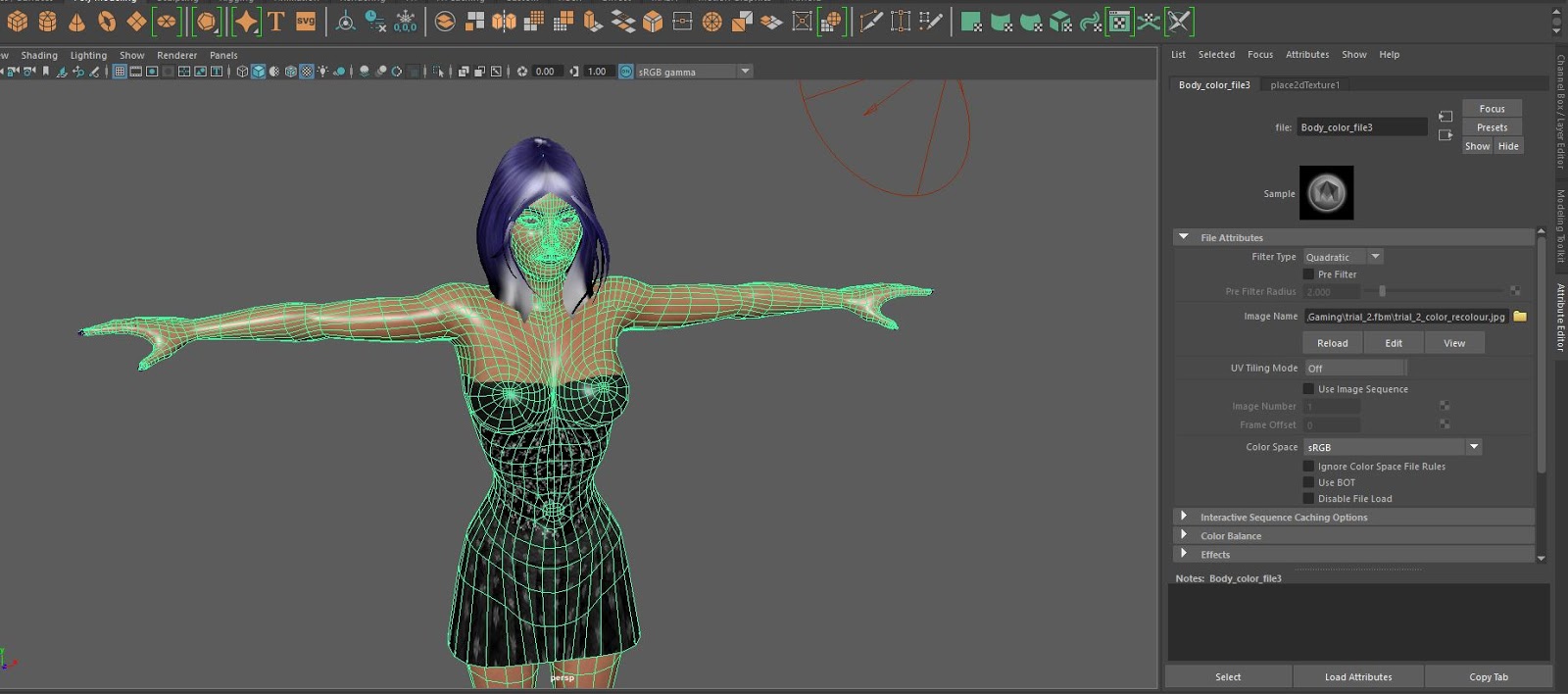
Today we worked on changing our generated characters in Maya. Using photoshop to make the changes to the mesh, and then using maya to apply the update mesh. Maya has the same controls as mudbox for rotation and POV movement.
 |
| Character in Maya |
 |
| Mesh in photoshop |
So far so good, the next step is adding wings as an object, and hopefully they will look ok. I wont be animating them though due to time constraints in class.

Wednesday, 28 March 2018
Gaming 28/3
Todays class has been about learning to use Unity to create an environment for our characters. Using imported 3D assets, we can manipulate them using W key to move, E key to rotate and R key to change size and scale. Holding the middle mouse button down and dragging is a quick way to navigate around the window, with holding and dragging the right mouse button to change the point of view. I have already started playing with the terrain painting features to create a mountain valley, hopefully a river or lake next. The painter itself is very similar to mudbox in the way it moves, it is very touchy too Ive noticed, hopefully practice with the program will help with that.

Second half of class was playing with water, once I was shown how to do it, what I wanted to achieve became easier. I must remember to drag and drop from the assets down the bottom to create the textures. The water itself seems constrained to a round plane, and so creativity is needed to make a river. Currently I have 3 water objects, all manipulated differently, to get the result in the following picture. Although the limitations of the water seem annoying, it is easy enough to solve the issues by not treating the plane as the ground, and building up platforms for the environment and modifying those instead.


Second half of class was playing with water, once I was shown how to do it, what I wanted to achieve became easier. I must remember to drag and drop from the assets down the bottom to create the textures. The water itself seems constrained to a round plane, and so creativity is needed to make a river. Currently I have 3 water objects, all manipulated differently, to get the result in the following picture. Although the limitations of the water seem annoying, it is easy enough to solve the issues by not treating the plane as the ground, and building up platforms for the environment and modifying those instead.

Thursday, 22 March 2018
Gaming 21/3
Today was a class on finishing the proposal, it was really good to get clarification from Vaughn in regards to word counts and a chance to do a final go over before submitting it. The first one is always the hardest so it will be good to get feedback so I can figure out if Im on the right track or not. I also had another play with the autodesk character generator, and I think this second iteration is a better take on my characters look. Once wings are added I will be happier. Vaughns preliminary play in Unity with animation shows promise, not for flying but at least for walking around naturally with the wings on the back.
Wednesday, 14 March 2018
Gaming 14/3
Today we got to play with Autodesk Character Generator. It was cool to get a 3d concept of what my character will end up looking like, however there is a few limitations ie. no wings options so I will have to add them in photoshop later. As a basic model program, this is a good way to hash out ideas and see how they translate from words/2d drawings into the 3d environment.
 |
| Aeliwina Darkstorm concept |
Little Wheel review
The art style of Little Wheel is very simplistic, solid black over an ochre-brown background, almost silhouetting like a light box. The actual environment itself consists of basic black line drawings depicting a world full of metal towers and robots. There is nothing natural at all in this world, which fits the robot theme perfectly.
The main character is a little robot, in a world of robots that have entered the "deep sleep" due to no electricity. After 10,000 years, our little robot is hit by a lightning strike which powers him up. Your mission is to reconnect the main generator so all the robots can come back to life. The main robot is endearing, in that he is a little bit clumsy, and keeps getting beat down on his mission but carries on trying to complete his task. This gives him almost a human feel, like Wall-E.
 |
| Figure 1. |
The gameplay is a little challenging, small circles tell the user where to click, however there is no explanation as to which order you click them, or what is required so you must use your brain to think outside the box to complete each task. Each panel works nicely to advance the overall story, moving the main character towards to end goal of the generator, hooking up power cords and transport along the way.
 |
| Figure 2. |
Overall, it is a very short game once you get the hang of it. A fun wee game for your brain that gives you 10mins of distraction.
Reference
Figure 1,2. https://www.kongregate.com/games/fastgames/little-wheel
Wednesday, 7 March 2018
Gaming 7/3
Machinarium game demo review.
The artwork is very steampunky, but nice and cleanly drawn, it reminds me of the artwork in Footrot Flats with the way its drawn. Nice muted tones add to the futuristic, robotic vibe of the game. The environment is nicely drawn in that its not blatantly obvious when looking at it what places are interactive without mousing over the top, like the old school animations when you could see the animated panels because they were a different colour.
The main character is a little robot that you move around, as you complete tasks to move onto the next area. For example the very first set of tasks is to somehow find his missing arm and leg whilst stationary, and get across the gap in the middle of the screen. The tasks are not obvious, some requiring you to find two items and combine them in your inventory before they will become usable, others require changing height and twiddling with settings to find the right combination.
The sounds along the way are synced well with the movements, and discoveries that you make. There is a calming, peaceful background track throughout the game also, which I like because I can see some of the tasks becoming quite frustrating very quickly.
I like the concept of this game because it requires a lot of "out of the box" thinking to find the next clues however as I mentioned earlier, it could be rather frustrating if you get stuck. Especially when certain tasks require your robot to be in a specific location and/or height to trigger actions.
Overall, I quite like the game, giving it an 8/10 overall. I would be interested in buying the game, providing there is several levels, to create long gameplay.
References:
Figure 1. Machinarium, 2009, http://machinarium.net/wallpapers/cover_1280x1024.jpg
Figure 2. Alley, 2009, http://machinarium.net/wallpapers/alley_1280x1024.jpg
The artwork is very steampunky, but nice and cleanly drawn, it reminds me of the artwork in Footrot Flats with the way its drawn. Nice muted tones add to the futuristic, robotic vibe of the game. The environment is nicely drawn in that its not blatantly obvious when looking at it what places are interactive without mousing over the top, like the old school animations when you could see the animated panels because they were a different colour.
 |
| Figure 1. Machinarium |
The main character is a little robot that you move around, as you complete tasks to move onto the next area. For example the very first set of tasks is to somehow find his missing arm and leg whilst stationary, and get across the gap in the middle of the screen. The tasks are not obvious, some requiring you to find two items and combine them in your inventory before they will become usable, others require changing height and twiddling with settings to find the right combination.
The sounds along the way are synced well with the movements, and discoveries that you make. There is a calming, peaceful background track throughout the game also, which I like because I can see some of the tasks becoming quite frustrating very quickly.
I like the concept of this game because it requires a lot of "out of the box" thinking to find the next clues however as I mentioned earlier, it could be rather frustrating if you get stuck. Especially when certain tasks require your robot to be in a specific location and/or height to trigger actions.
 |
| Figure 2. Alley |
Overall, I quite like the game, giving it an 8/10 overall. I would be interested in buying the game, providing there is several levels, to create long gameplay.
References:
Figure 1. Machinarium, 2009, http://machinarium.net/wallpapers/cover_1280x1024.jpg
Figure 2. Alley, 2009, http://machinarium.net/wallpapers/alley_1280x1024.jpg
Wednesday, 28 February 2018
Gaming 28/2
Today we finished watching Video Games: The Movie in class. A 2014 documentary on the beginning, and evolution of video games, and methods to play them from their creation to current day.
Started a powerpoint for the proposal. I need to find games that arent MMO to use as key works.
Plants vs Zombies Heroes, simple concept but highly addictive, encouraging the "just one more try" feeling. you plant various plants, each has a different use, to fight off waves of zombies. The resource you use to "buy" the plants is time limited, so skill is required in prioritizing purchases. As you unlock more plants, you have to decide which 7 plants you will use in each game, you cant use all of them.
Started a powerpoint for the proposal. I need to find games that arent MMO to use as key works.
Plants vs Zombies Heroes, simple concept but highly addictive, encouraging the "just one more try" feeling. you plant various plants, each has a different use, to fight off waves of zombies. The resource you use to "buy" the plants is time limited, so skill is required in prioritizing purchases. As you unlock more plants, you have to decide which 7 plants you will use in each game, you cant use all of them.
 |
| Figure 1. Loading screen |
I like using Green Shadow the most, the plants that are associated with her fit my way of playing this game nicely.
 |
| Figure 2. Green Shadow hero
Reference
Figure 1. Plants vs Zombies, 2018, https://www.ea.com/en-gb/games/plants-vs-zombies/plants-vs-zombies-heroes
Figure 2. Plants vs Zombies, 2018, https://www.ea.com/en-gb/games/plants-vs-zombies/plants-vs-zombies-heroes
|
Wednesday, 21 February 2018
Gaming 21/2
Character Research
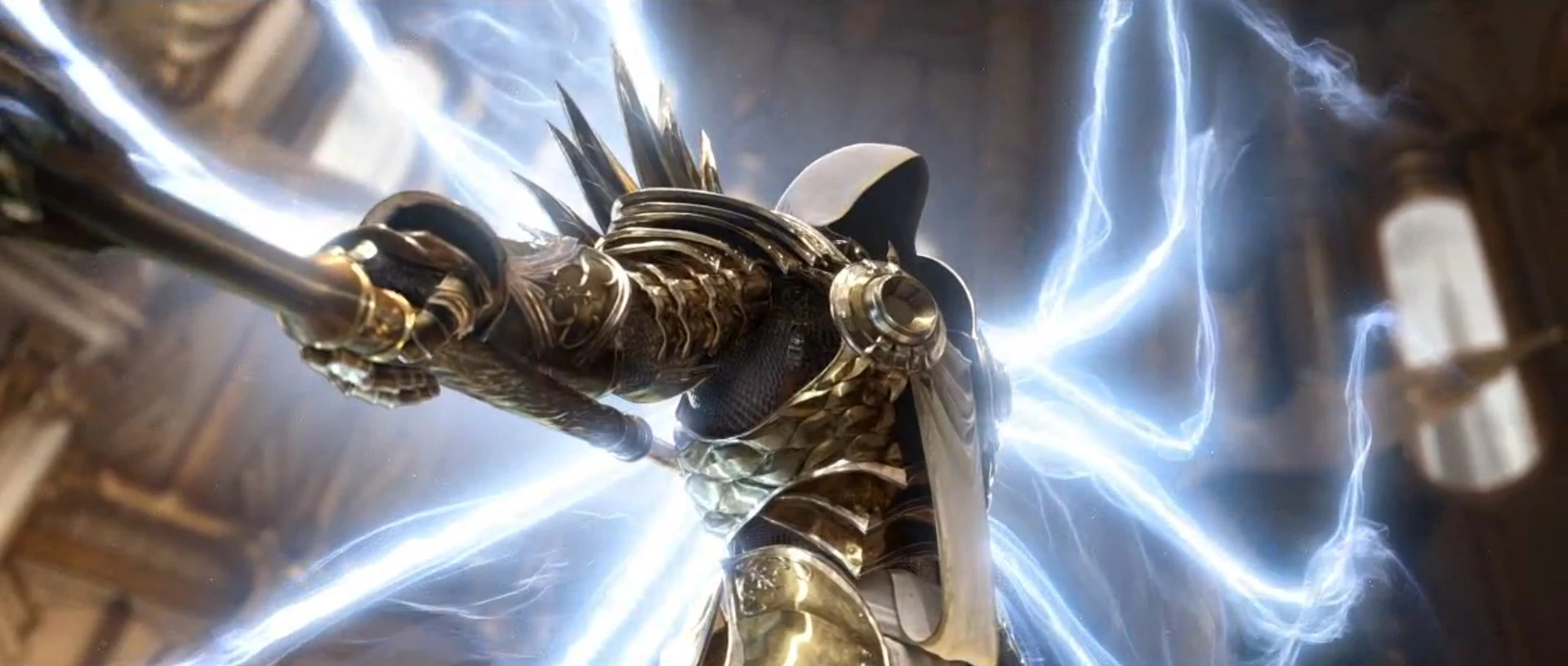
My character choice is Tyrael from the Diablo series, mostly Diablo III. Tyrael was the archangel of justice, until he chose to become mortal instead of leaving mankind to its own misfortune, against Imperius's orders.
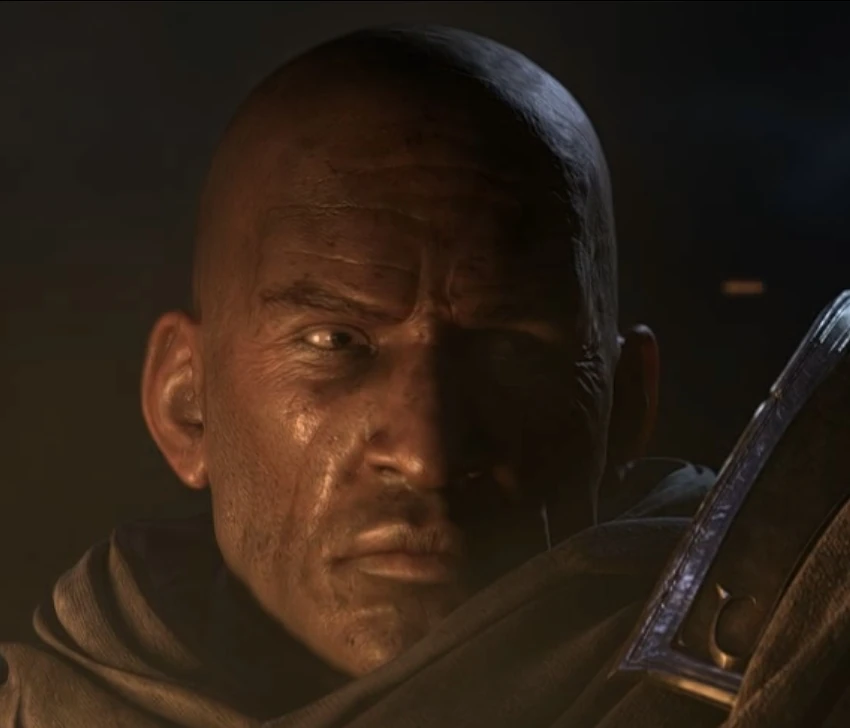
He crashed into the world known as Sanctuary, to help mankind defeat the lesser evils that have risen again. He helps your character progress through the stages, providing consult and insight into each enemy whilst interjecting quips as he slowly learns what it is to be a mortal. His greatest strength could also be his greatest weakness, compassion for mortals. This compassion is the reason for his fall, the reason he became ostracized from all angelkind as time went on. He constantly struggles against the corruption that was released into the world by Diablo when he escaped, affecting Tyrael more and more as time goes on, due to previously being an angelic creature, but no longer having access to the angelic powers that kept him safe.
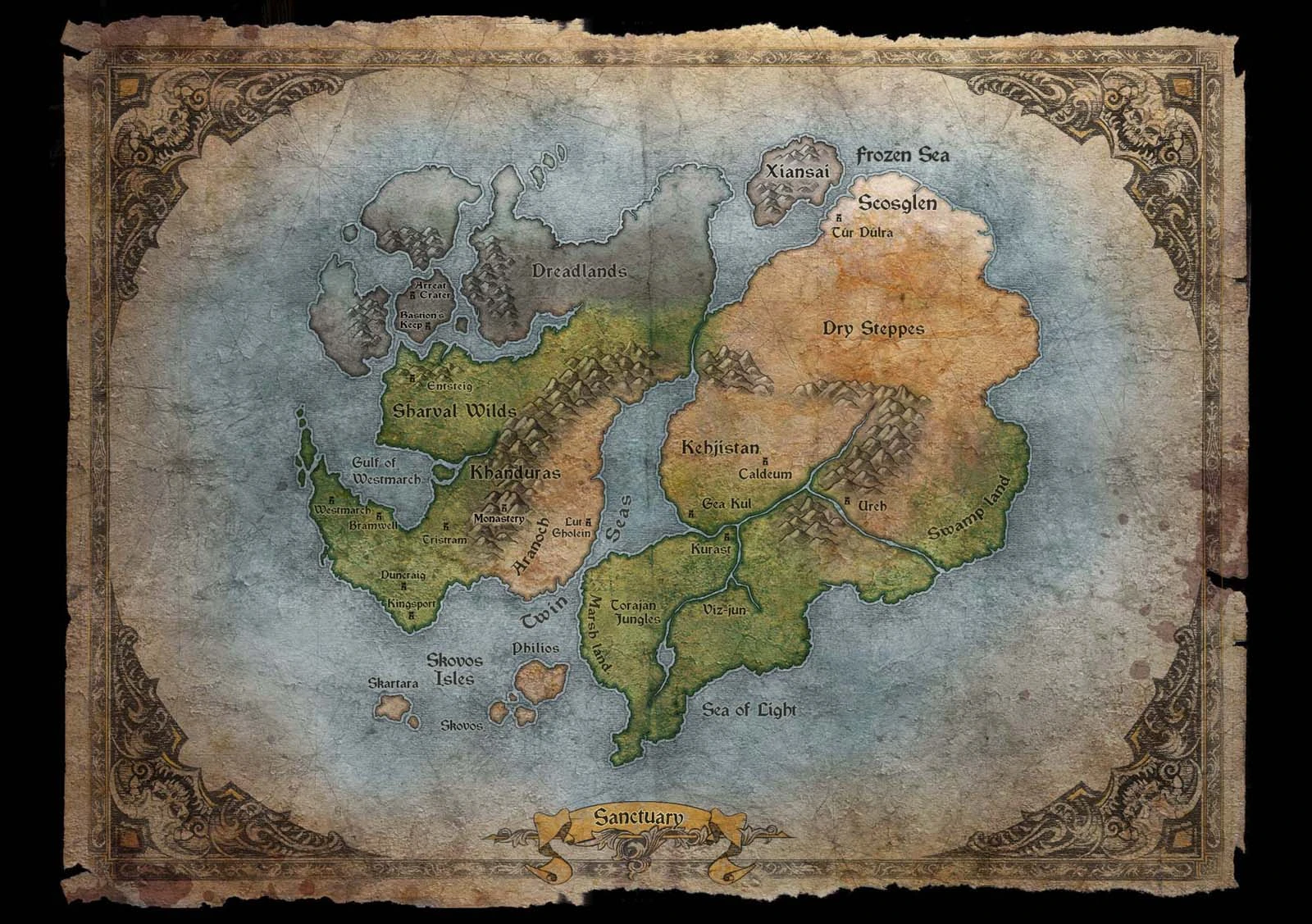
Sanctuary is a post apocalyptic world, where good and evil are in constant conflict, all sort of magical creatures, and corrupted humans are out to get the player. There is a sect of the humans whos primary focus is gaining power for the lesser evils Belial and Azmodan, the multitude of creatures is a side effect of the powers used to summon the evils to the world.
http://diablo.wikia.com/wiki/Tyrael
My character choice is Tyrael from the Diablo series, mostly Diablo III. Tyrael was the archangel of justice, until he chose to become mortal instead of leaving mankind to its own misfortune, against Imperius's orders.
 |
| Archangel Tyrael, Sourced from http://diablo.wikia.com/wiki/Tyrael |
He crashed into the world known as Sanctuary, to help mankind defeat the lesser evils that have risen again. He helps your character progress through the stages, providing consult and insight into each enemy whilst interjecting quips as he slowly learns what it is to be a mortal. His greatest strength could also be his greatest weakness, compassion for mortals. This compassion is the reason for his fall, the reason he became ostracized from all angelkind as time went on. He constantly struggles against the corruption that was released into the world by Diablo when he escaped, affecting Tyrael more and more as time goes on, due to previously being an angelic creature, but no longer having access to the angelic powers that kept him safe.
 |
| Mortal Tyrael, Sourced from http://diablo.wikia.com/wiki/Tyrael |
Sanctuary is a post apocalyptic world, where good and evil are in constant conflict, all sort of magical creatures, and corrupted humans are out to get the player. There is a sect of the humans whos primary focus is gaining power for the lesser evils Belial and Azmodan, the multitude of creatures is a side effect of the powers used to summon the evils to the world.
 |
| Sanctuary, sourced from http://diablo.wikia.com/wiki/Sanctuary |
http://diablo.wikia.com/wiki/Tyrael
Wednesday, 14 February 2018
Gaming 14/2
Video Game Study
Today I have chosen World of Warcraft, as my favourite video game. World of Warcraft is a MMORPG released in 2004 by Blizzard Entertainment, and as of nov 2017, the 7th expansion was announced at Blizzcon.
Being an mmo, you have many ways to level and explore the environment, so it takes a long time before it gets repetitive. However Blizzard has timed each expansion release nicely, when the subscribers are just starting to lose interest they release a new one. As an added bonus, there are many other real people online with you, that you can talk to and play with.
The character that attracts me the most is the npc Sylvanas Windrunner. Her story starts with a power crazy Prince Arthas killing her and resurrecting her as a banshee queen, hoping that she will serve him. Instead she vows eternal revenge and spends her time trying to free the enslaved undead from his mental grasp. The resulting army is called the Forsaken, chaotic and slightly evil, but loyal to their queen. Her development over the expansions leads to her eventually becoming warchief of the Horde faction, with the players help. She is a badass warrior babe with supernatural powers, that struggles with the dark choices she has to make in order achieve her goals. I think this aspect of her character is what makes her relatable and realistic to the player.
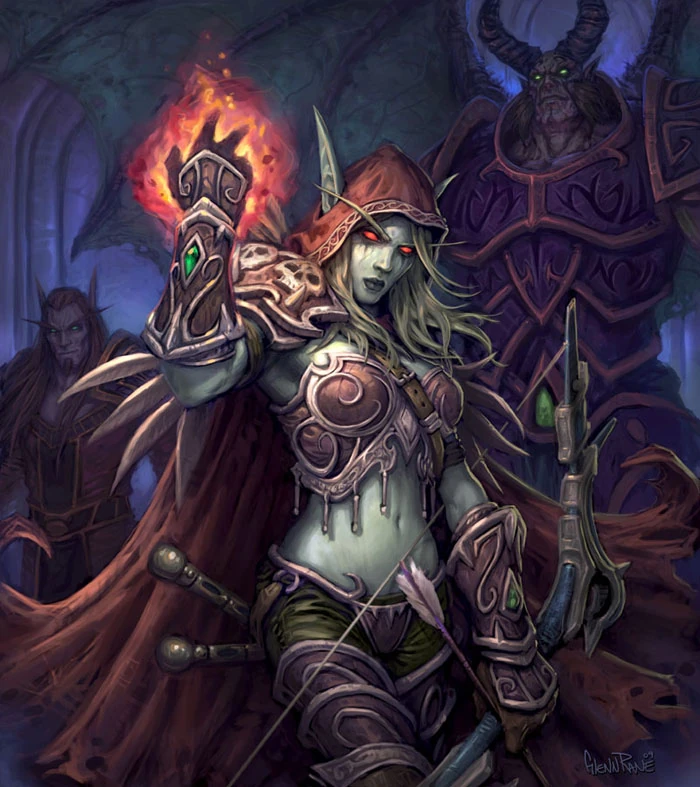 |
| Sourced from http://wowwiki.wikia.com/wiki/Sylvanas_Windrunner |
Subscribe to:
Posts (Atom)
BSA702 14/7
arrays and lists Quick and Easy Galaxy painting great tutorial I found when I was looking for a background for my pitch tomorrow. I want t...

-
Character/Game idea colour dropper - player has a set amount of time to pick a colour to stand on, all other colours drop out causing player...
-
2019.1.8f1 unity version - update home install to match. Look into the software bundles I got from humble and see if they are useable for cl...
-
 Preliminary game-flow chart Make a title Colour Party Who is the game for Ages 6 and up What is the game play style 3D, Round based colour m...